Galaxy Z Fold8 Ultra may be recognizable for its 8-inch folding main display, but the device’s real benefit is more than simply having a larger screen.
 0
0
 0
0
Building on established Galaxy tools such as Multi Window1 and Samsung DeX, new context-aware experiences for foldables, such as Now Nudge,2 help keep more of a task visible and make it easier to move from one step to the next without constantly switching apps. Whether you’re researching, planning a trip or editing content, Galaxy Z Fold8 Ultra adapts to the way you work, helping you accomplish more from a single device.
Why Is Galaxy Z Fold8 Ultra Good for Productivity?
Galaxy Z Fold8 Ultra can transition from its 6.5-inch cover screen to its expansive 8-inch main screen3 without losing your place. Start with an app while the device is folded, then open it to continue right where you left off with more room to examine a photo, comfortably review a spreadsheet or work across supported apps side by side.
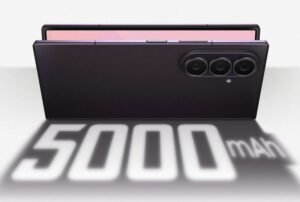
The Snapdragon 8 Elite Gen 5 Mobile Platform for Galaxy,4 5,000 mAh battery5 and expanded graphite cooling structure help keep the device responsive during demanding multitasking, content creation and AI-powered tasks. Galaxy Z Fold8 Ultra is like a mobile workspace that can adapt to the task at hand.
How Do I Use Multiple Apps at Once?
Multi Window lets you run supported apps side by side on the main screen. Galaxy Z Fold8 Ultra supports two-way and three-way split view, and you can resize the individual windows to suit your task. Check your calendar while replying to a message, search the web while reviewing a presentation, or use a calculator while reviewing your budget. You can also open supported apps in pop-up view when you want a movable, resizable window over your existing workspace.
You can even quickly access frequently used apps from the Taskbar at the bottom of the main screen, like you would on a tablet. If you regularly use the same apps together — such as Calendar and Messages — you can save them as an app pair and reopen the combination in split view with one tap.
What Is Now Nudge and How Does it Work?
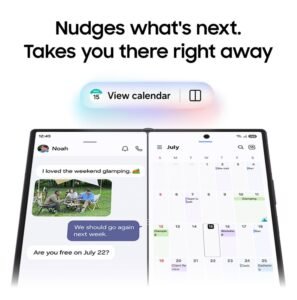
With Now Nudge, Galaxy Z Fold8 Ultra automatically recognizes what you’re doing and proactively suggests what you might want to do next. For example, if you’re messaging about meeting up with a friend for dinner, it might suggest adding it to your calendar. When you tap to open your calendar app, the conversation stays visible on one side of your screen, helping you move forward without losing context or manually switching between windows.
What Is Samsung DeX and How Does It Work on Galaxy Z Fold8 Ultra?
Samsung DeX makes it possible to use Galaxy Z Fold8 Ultra in a desktop-like workspace. Connect a monitor, keyboard and mouse6 to work across multiple apps in resizable windows, use a desktop-style taskbar and navigate with a cursor for a complete mobile workstation.